TABLE OF CONTENTS
- Understanding User Roles
- Role Permissions
- Notes for Clever and ClassLink Integration
- How to Request a Role Change
Knowing who can create, manage, and view Common Assessments in Wayground is important for smooth implementation. Permissions are assigned based on user roles within Wayground to ensure that educators and administrators have the appropriate level of access.
Understanding User Roles
Here are the main roles involved in the Common Assessments process:
System Admin: Manages the entire organization, including rostering, integrations, and user roles.
School Admin: A specialized role available in the Wayground District plan with the Common Assessments add-on. A School Admin can view Common Assessments shared with their school, track participation, and monitor student performance.
Assessment Coordinator: A specialized role, available in the Wayground District plan with the Common Assessments add-on. Teachers with this role can create and manage Common Assessments.
Educator (Teacher): Administers Common Assessments to their classes, views class-level performance data, and can access all teaching features on Wayground outside of Common Assessments.
Role Permissions
The table below shows what each role can do in Wayground. This helps clarify who can create Common Assessments, which Common Assessments they can view, and what level of reporting data they can access.
*School Admin: Specialized role available in district plans with the Common Assessments add-on. School Admins gain visibility into CAs based on school selection — they automatically get access to any CA where their school is included.
**Assessment Coordinator: Specialized role available in plans with the Common Assessments.
***Admin controls: Include teacher and staff rostering, role management, integrations setup, content policy setup & usage analytics.
How access works:
Admins and School Admins get visibility into Common Assessments based on the schools selected during CA creation. This applies regardless of when they are added to Wayground — a School Admin added mid-year automatically sees all relevant CAs for their school.
Teachers are synced from Teams or Courses. Membership syncs until the CA start date, and additions continue until the CA end date.
CA Creators can track proctors and admins directly from the CA Details Page.
Notes for Clever and ClassLink Integration
For Clever: - All district admins from Clever are mapped to the System Admin role in Wayground. - All school principals from Clever are mapped to the School Admin role in Wayground.
For ClassLink: - All admins for district orgs from ClassLink are mapped to the System Admin role in Wayground. - All admins for school orgs from ClassLink are mapped to the School Admin role in Wayground.
How to Request a Role Change
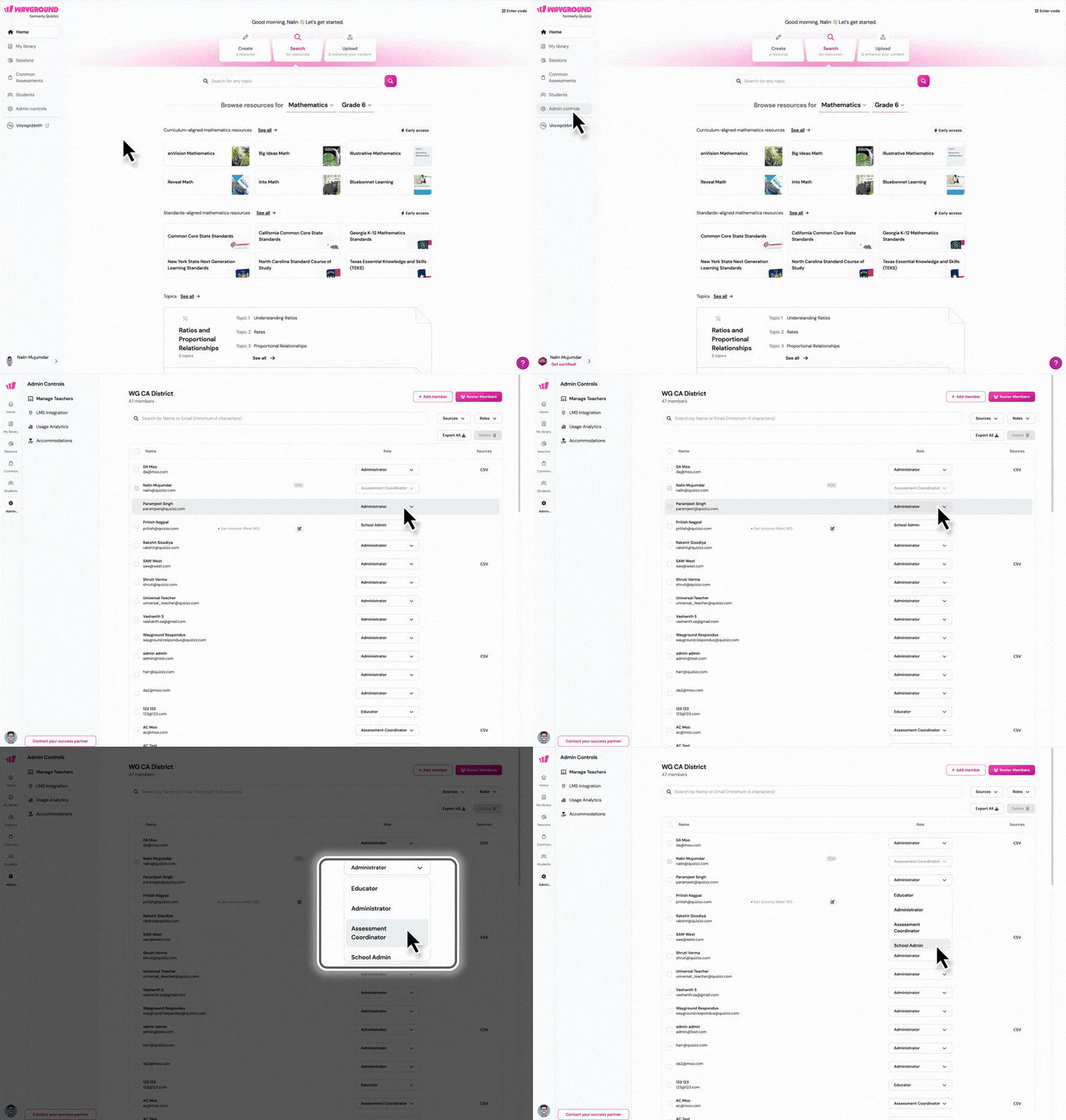
If you are an Educator and need the ability to create Common Assessments, you need a role update. Please contact your Wayground System Admin to request this change. They can update your role by going to Admin Controls > Manage members/teachers.
Was this article helpful?
That’s Great!
Thank you for your feedback
Sorry! We couldn't be helpful
Thank you for your feedback
Feedback sent
We appreciate your effort and will try to fix the article